
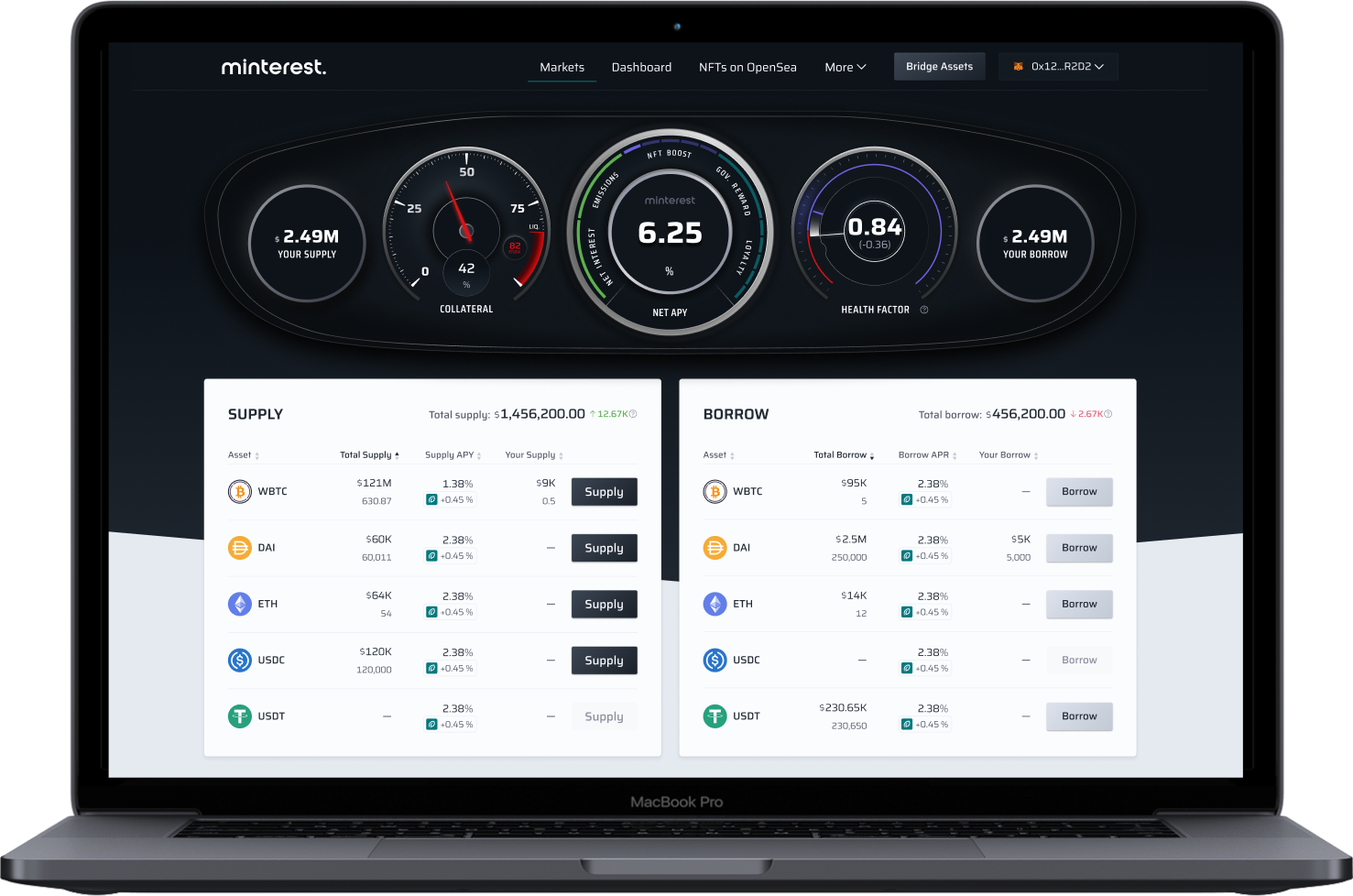







The highest long term yield in DeFi
Technical innovation
Made possible by DeFi’s first liquidation engine, Minterest is able to capture significantly more fees than any other protocol.
Maximised APYs
Using maximised fees, the protocol buys back its native MINTY token to distribute as rewards to users who contribute to governance. In return they receive the highest long term yields in DeFi.
Asset protection
Minterest sophisticated risk prediction engine supports borrowers in protecting their assets. With live alerts, the engine allows effective management of downside risk.
Backed by the best
A global portfolio of leading investors





































Minterest Blog
All newsMinterest Continues to #BUIDL
At Minterest we never stop building. Here we are sharing latest product releases
08, May 2024
UI improvements
The engineering team improved the user experience for the mobile version of the application. The UI for bridging NFTs and future MINTY tokens received an update. Future improvements to the user experience are in the pipeline.
17, April 2024
Minterest UI Update and Migration from Goerli to Sepolia
The engineering team has been working on applying the UI changes built for Mantle network to the Ethereum instance of the Minterest protocol. Significant efforts were spent to migrate test environments of the protocol from the deprecated Goerli test network to the new Sepolia instance. New market models for Minterest on Mantle were deployed to the main net.
03, April 2024
Improvements to the UI
The engineering team has delivered one more set of quality of life improvements to the UI of the protocol. Preparation work for future developments is started, investigation of new chains is initiated.
28, March 2024
Analysis tools for the Solvency engine
The engineering team prepared data analysis tools for the Solvency engine and supported the Mantle Tectonic upgrade with multiple updates to adapt the changes introduced by it.
21, March 2024
The engineering team implemented Minterest’s upgrade to support the Mantle V2 migration.
Collateral levels of each market was increased to ramp up borrowing capabilities and the liquidator was updated for the Mantle v2 gas fee system. Minor tweaks and improvements on the frontend like collateral gauge accuracy and NFT visibility was carried out.
13, March 2024
Mantle V2 migration
The engineering team has prepared the protocol for the Mantle V2 migration. Additionally, the Solvency Engine is further with improved notifications to provide users additional information on their portfolio status.
06, March 2024
Fixing UI issues
The engineering team is fixing UI issues and implementing quality of life improvements for Minterest users.
28, February 2024
Minterest NFTs on Mantle Network
This week the engineering team has finalised the delivery of the NFT bridging solution for Ethereum <> Mantle Network and supported the launch of the Minterest NFTs on Mantle Network.
21, February 2024
NFT bridging solution
The engineering team has finished the NFT bridging solution. A new version of solvency engine is prepared for testing on Mantle network. Several quality of life improvements are deployed to the UI of the protocol.
15, February 2024
Enabling NFT transfers
The Minterest engineering team is working on enabling NFT transfers using the LayerZero bridging solution. In addition, optimisations are being made on the solvency engine.
07, February 2024
USDY/mUSD and MNT/wMNT token markets
This week, the engineering team refined the USDY/mUSD and MNT/wMNT token markets. The improvements enable users to supply and borrow tokens within these pairs effortlessly, eliminating the necessity for manual conversion between them.
31, January 2024
$mETH & mUSD are LIVE on Minterest
This week the Minterest engineering team launched the mETH and USDY markets on Mantle network together with a pack of UI improvements. Thanks to the efforts the Minterest project becomes more and more user friendly.
19, January 2024
Stabilisation of the web infrastructure
The engineering team was focused on stabilisation of the web infrastructure and preparing extensions to the protocol – new markets and migration to an alternative oracle solution.
10, January 2024
The engineering team supported the launch of Minterest on the Mantle Network
The engineering team supported the launch of Minterest on the Mantle Network through a series of quality of life improvements including optimisations to the UI.
27, December 2023
Minterest protocol contracts deployed on Mantle main net
Last week the engineering team deployed the Minterest protocol contracts on Mantle main net. The engineers are configuring the contracts and testing all aspects of the system including bridging of assets, governance and additional rewards systems unique for Mantle instance of Minterest.
20, December 2023
Minterest Prepares for Mantle Launch with Enhanced UI and Cross-Chain Testing
Last week the engineering team delivered several more UI features designed for the Mantle Network launch including a new incentives mechanism and interface. In addition are cross-chain staging tests, minor fixes, and polishing of the user experience.
14, December 2023
Minterest Engineering Focuses on Infrastructure Stabilization for Upcoming Cross-Chain Launch
This week the engineering team focused on stabilisation of infrastructure for the cross-chain launch. We’ve put all required web services up and running abd started series of scurpulous tests. The results are processed in real time and the detected issues are put into a pipeline for fixing.
06, December 2023
Minterest Engineering Prepares for Multi-Chain Deployment
The engineering team is in the process of preparing the deploy of Minterest onto the Mantle Network. This includes all the related contracts and infrastructure to be configured including introducing multi-network capabilities and connecting the Front End to new APIs. Minterest’s UI interface has also been updated to support the multi-chain deployment.
29, November 2023
Minterest Engineering Implements MINTY Balance Tracking Across Protocols
This week, the engineering team focused on developing tools for streamlined monitoring of MINTY balances across various protocol systems. Essential for Minterest’s cross-chain strategy, these tools enable us to efficiently track unclaimed MINTY tokens in different contracts, identifying the proportion available for withdrawal and reallocation to other networks.
22, November 2023
Minterest Adapts to Optimistic Rollups
The last week engineers of Minterest spent adapting the protocol to the optimistic rollup networks, where the block generation principle differs from the Ethereum one. This change entails rewriting of a significant amount of contracts which use block numbers including money markets and DAO. With this improvement Minterest can be faster deployed to a vast majority of chains.
15, November 2023
Integration of LayerZero bridging solution
Integrated LayerZero bridging solution into the Minterest protocol, including ONFT standard for transferring NFTs.
08, November 2023
Minterest Team Plans for Multi-Network Expansion and Enhances UI with NFT Carousel
The Minterest engineering team investigated the scope of work to deploy the protocol contracts to another network including planning for necessary code changes, infrastructure tweaks, integrations, and tests. Additionally, the team deployed an NFT carousel for users with multiple NFTs, along with several other UI tweaks.
01, November 2023
Minterest Evaluates New Networks for Deployment
This week the team focused on investigating the infrastructure of new networks where Minterest can be deployed including available token assets, DEXes, oracle solutions, bridges, and RPC networks. A new navigation bar and Privacy policy page were also shipped to production servers.
25, October 2023
Minterest Explores Anti-MEV Solutions, Advances Cross-Chain Preparations
This week was dedicated to investigation of Anti MEV solutions for the liquidation flow. We’ve througly studied several competing solutions to define pros and cons of each one. We also continue preparations for going cross chain. The tech team optimises contracts, removes logic not required on mirrors and prepares MINTY contract for bridging.
18, October 2023
Uniswap’s Alpha Router Integration
Offchain services were updated to properly communicate with Alpha Router of Uniswap – the DEX used by Minterest during liquidation of insolvent loans. The new logic operates properly within the new Flash Loan based flow and is optimised to avoid cancellation of transactions.
11, October 2023
Integration Week: Engineering Team Implements Partner Tools
This week is dedicated to integrations of solutions from our partners. The engineering team has built implementations of several wallets, widgets and third party products which will be announced in due time.
04, October 2023
Brand Refresh & UI Tweaks: Minterest Gears Up for Security Audit
New brand colors were delivered to production servers, as well as a bunch of minor UI tweaks and fixes, which improve stability of the UI and enhance user experience. The Minterest team prepared the code for the new security audit. This includes increasing of NFT life span and change of the native token ticker.
27, September 2023
On-chain liquidation
The web services are updated to support on chain liquidation – preparing input data, processing outputs and logging the flow. The infrastructure of Minterest now handles on-chain events with grace. Successful liquidations no longer require reserves on a market to liquidate an insolvent position – flash loans are now used to repay debts
20, September 2023
Offchain liquidation services
Offchain liquidation services are adapted to the new on-chain logic and are able to properly track borrowers and their states. New data types and adapters were also implemented to support the new liquidation flow.
13, September 2023
Enhancing User Experience: New UI Improvements
We’ve rolled out various User Interface enhancements on our production servers. These updates include additional navigation options accessible from the Supply transaction success modal. We’ve also streamlined the pages by removing redundant NFT data since NFTs are not yet active.
06, September 2023
Enhancing Off-Chain Algorithms for Liquidation Logic and Flash Loans
Our off-chain algorithm has been optimised for 1-to-1 liquidation logic and flash loans, a significant improvement over the previous all-to-all approach. Debugging and identifying the best liquidation pair are now quicker, further enhancing our platform’s efficiency.
30, August 2023
We have prepared a fix for Wallet Connect.
The library is migrated to a new version, the usage of older editions is no longer possible. That is why our web developers had to integrate the new version of WalletConnect and implement all related supporting features. This fix is soon to be delivered to our users.
23, August 2023
Introducing Integration Scripts for Protocol’s Liquidation Contracts
We’ve designed deploy scripts, simplifying the process of integrating new liquidation contracts into different environments. These scripts establish smooth connections with existing protocol instances.
16, August 2023
We’ve wrapped up development on the Flasher, a contract that coordinates with DEXes when the Liquidator contract receives ceased collateral.
The Flasher handles flash loans, DEX swaps, and liquidation profit. Its complete with unit tests and ready for auditing and Ethereum main net testing. Both Liquidation and Flasher contracts also underwent benchmark testing, offering insights into gas consumption per transaction. This valuable tool aids future gas optimization efforts.
09, August 2023
CI/CD (Continuous Integration and Delivery) tools are revived.
The tooling was conservated for some time, now the team can operate using best practices and proper quality gates like unit tests.
02, August 2023
Rework Liquidation contract to use flash loans and 1 to 1 liquidation approach.
This contract is an orchestrator of the flow, not the executing contract and is responsible for validations, seize of collateral, API to get data offchain, internal calculation logic. All the pieces are now ready to work with flash loans.
28, April 2023
Release v2.1.12
Bug-fix: Dashboard: Available MINTY rewards calculation fix
Fixed an issue where users with only 1 activity in the protocol money markets caused their Available MINTY count fluctuate after first full period (30 days) of unlocking occurred. Total MINTY rewards were not affected.
28, April 2023
Release v2.1.12
Feature updates: Dashboard: My positions table – NFT boost blockFeature updates
Users can now see their NFT boost as a separate value for each market.
28, April 2023
Release v2.1.12
Feature updates: Portfolio risk gauge MVP
We have launched our MVP for Risk Gauge. Where users can see their portfolio risk in 72h timeframe in the scale of 0-100.
20, March 2023
Release v2.1.11
Bug-fix: Dashboard: Portfolio distribution chart – Design fixes
Fixed the Title position and pie chart alignment within the block.
16, March 2023
Risk Endpoint Testing
We introduced an API endpoint functionality that calculates the probability of default for a given portfolio using collateral and borrowing data. The tool enables monitoring the overall health of a selected portfolio by assessing the risk over the next three days.
16, March 2023
Release v2.1.10
Feature updates: Dashboard: Portfolio Distribution chart
Users can now see their Portfolio distribution on both Supply and Borrow side, shown as pie chart.
15, March 2023
Release v2.1.9
Bug-fix: User session disconnected upon refresh with Safari and WalletConnect
Users who connected to Minterest with Safari and WalletConnect were disconnected from App after manual refresh.
15, March 2023
Release v2.1.9
Feature updates: Gauges: Market details page – Replaced Token amounts visible in the gauges
On market details page – in gauges area now it shows “Your Total supply or Borrow” amount, instead of Your <Token> amount.
09, March 2023
Release v.2.1.8
Feature updates: Dashboard: NFT block – Added additional disclaimer on block header
Users can now see disclaimer that NFT boost is not enabled during Private launch.
09, March 2023
Release v.2.1.8
Feature updates: Dashboard: NFT block – Updated the link to correct address on Opensea
Minterest updated Opensea NFT collection link from opensea.io/collection/minterest-nft to opensea.io/collection/minterest
09, March 2023
Release v.2.1.8
Feature updates: Global number display rules – Updated USD values in compact view to X.XX format
All compact numbers globally are now converted to X.XX format at all times.
08, March 2023
Release v.2.1.7
Bug-fix: Dashboard: MINTY Rewards – Display of Governance reward APY
Users who only supplied to different markets once and had Governance participation turned on did not see Governance reward APY.
08, March 2023
Release v.2.1.7
Bug-fix: Transaction details – Behaviour of Approval on USDT market
The USDT token smart-contract does not allow approve operations if the spender already has an allowance greater than zero.
08, March 2023
Release v.2.1.7
Bug-fix: NET APY Gauge – Removed % sign after NFT tier
The % sign was accidentally added, and has now been removed, on the NFT boost displaying the Tier.
08, March 2023
Release v.2.1.7
Bug-fix: Supply-Borrow-Repay-Withdraw modal within the Gauges – Hide Gas cost prediction
The gas prediction modal has been hidden while the team works to improve its accuracy.
08, March 2023
Release v.2.1.7
Feature updates: App Navbar – New menu “More” added
Users can now see quick links to the most important pages, like FAQ, community channels, code repository and Terms of Use.
07, March 2023
Release v.2.1.6
Bug-fix: Dashboard and Markets table views – Removed NFT boost % from the APY blockBug-fix:
Standard Emissions APY and NFT Emissions (“NFT boost”) APY are now displayed separately for clearer messaging.
07, March 2023
Release v.2.1.6
Feature updates: Supply-Borrow-Repay-Withdraw modal within the Gauges – Enable collateral message
A message will appear to enable supplied assets as collateral to increase borrow capacity if it is not currently enabled.
07, March 2023
Release v.2.1.6
Feature updates: Supply-Borrow-Repay-Withdraw modal within the Gauges – Enable governance participation message
A message will appear to enable governance participation to receive staking rewards if it is not currently enabled.
07, March 2023
Release v.2.1.6
Feature updates: NET APY Gauge – Display % sign with larger font and white color
Users can now see the % sign more clearly inside the NET APY gauge, including displaying the % sign when hovering on elements like “Emissions.”
06, March 2023
Release v.2.1.5
Bug-fix: Markets Overview: Fixed separator colour between the header and body
Fixed minor UI issue on the markets overview page that affected the layout for tablet users only.
06, March 2023
Release v.2.1.5
Bug-fix: Fixed Collateral bug after withdrawing all supply from the protocol (dust bug)
UI improvements have been made for users who withdraw all of their positions since they will still have fractional amounts of assets (dust) left in the protocol.
06, March 2023
Release v.2.1.5
Feature Update: Front Page: Added Supply & Borrow tooltips (NFT access required)
During Private Launch phase, users without NFTs will be provided a tooltip message on the Supply and Borrow buttons that a Minterest NFT is required in order to use protocol features.
06, March 2023
Release v2.1.5
Bug-fix: Market Details: Fixed the display of Net APY per market where the user has only borrowed
Users can now see each market Net APY on the respective market page when solely borrowing (not supplying).
06, March 2023
Release v2.1.5
Feature Update: Front Page: Added Total Supply & Borrow values on top of table header
Users connecting their wallets can now see protocol total supply and total borrow amounts in USD.
06, March 2023
Release v2.1.5
Feature Update: Dashboard: Display Total MINTY Rewards in “MINTY rewards” block
Users can now see the amount of total MINTY Rewards earned including both withdrawable and locked MINTY rewards.
03, March 2023
Release v2.1.4
Feature Update: Dashboard: Added Stake / Withdraw button tooltips
The tooltips inform users that both Stake and Withdraw MINTY features are disabled during the Private Launch phase.
03, March 2023
Release v2.1.4
Feature Update: Navbar: Added “NFTs on OpenSea” Button
Minterest NFTs are needed to use the protocol during the Private Launch phase so the button links to Minterest’s OpenSea NFT marketplace.
03, March 2023
Release v2.1.4
Feature Update: Dashboard: Hide Total Returns and Net APY graphs
The charts require significant updates to provide more meaningful information to users so they have been hidden for the time being.
02, March 2023
Codebase Optimizations
Integrated Manual Swap Manager into all inquisition services and adjusted the codebases to increase the efficiency of the protocol.
28, February 2023
Integrated Gas Price Prediction
Bring in gas price prediction to set the correct gas for swap/transfer transactions and prevent tx from hanging.
23, February 2023
Improved Transaction Success Modals
Improved performance of modals related to transaction success. The update affects all modals that display transaction success messages with transaction details: Supply, Borrow, Withdraw, and Repay. Made the Transaction ID clickable for a better user experience.
21, February 2023
Redesigned Autostaking On/Off
Renovated the autostaking feature design in accordance with the latest Minterest UX/UI guidelines. We’ve updated error, success, and other modals related to autostaking.
16, February 2023
Loading speed optimizations
Compressed images used in the app to impact loading speed and improve search engine performance.
14, February 2023
Loyalty Reward System Updates
Revamped the loyalty reward logic to incentivise a wider range of users, substitute the buyback discount curve, and allow users to withdraw some amount of their income without losing the loyalty factor.
09, February 2023
Risk Index Prototype
Developed a prototype to test tools that will allow users understand their portfolio risk in a better way and borrow safely.
07, February 2023
Optimization
Made some improvements on the app loading speed
02, February 2023
Wallet Connection
Rolled out Blocknative integration to connect wallets
31, January 2023
Automated liquidations
Updated the logic of receiving oracle prices and filtering out suspicious results
26, January 2023
Automated liquidations
Made some more progress, got borrower tracking running reliably
24, January 2023
UI Improvements
Updated the design of the Connect Wallet modal dialog for connecting the wallet with the Minterest application across all the devices, including Desktop, Tablet, and Mobile.
19, January 2023
Safari & Mozilla UI Fixes
Optimized rendering for on-site charts in Safari and Mozilla Firefox browsers. Streamlined UI experience related to the Total Returns and Total Net APY charts.
17, January 2023
Minterest Widget Modifications
Revamped the vesting widget with new designs. The new layout explicitly displays how updated tokenomics applies to all vestings.
12, January 2023
The MINTY Rewards Panel Design Revamp
Updated the following modal windows: Enable Collateral, MINTY Staking and MNT Withdraw. Optimized the modals for Desktop, Tablet, and Mobile access.
10, January 2023
Interface Logic Improvements
Specified internal and external interface classes to ensure that our contracts meet current industry standards and provide the necessary security for all parties.
20, December 2022
Total Net APY Chart Re-Work
Added some improvements to the Total Net APY chart data with newer optimisations.
16, December 2022
Fixed Metamask bug In Firefox Browser
Fixed a bug with connecting Metamask from the Firefox browser. An error message was shown before when the user tried to connect their wallet via metamask in Firefox.
13, December 2022
Update Main Navigation
We have added a new navigation UI on the website that makes it easy to access all the Minterest-specific product offerings and information.
08, December 2022
Fixed Loading Issue On Safari
Asset logo images used to load extremely slowly on the Safari browser. This issue has been fixed by re-working the frontend code and design assets.
06, December 2022
Liquidations Tracker v2.0
We are constantly improving and adding new features to our automated liquidations mechanism, this time with the liquidations tracker v2.0. More details will be shared in future tech insights.
02, December 2022
Indexer API Performance Monitoring
Added the performance monitoring to some of our internal services for Indexer API. The system triggers an alarm in abnormal cases.
30, November 2022
Security Improvements
We have made some more security improvements to the new isolated production infrastructure by moving production hosted zone into the corresponding environment.
25, November 2022
Delay Emission & BDR Boosting
The current logic works in such a way that during the delay period, the boosts from the NFT or BDR are divided into a delay and a normal part.
At the moment of transition from delay period to claimable period – we use the final MNT index of the market in order to separate the delay part for the period, but delayEndIndex is taken from the market storage, i.e. no boosts will affect it, and as a result, the delay part is calculated only for diff = delayEndIndex – lastMntUserIndex, and the boost is calculated without any correction factors.
22, November 2022
Set Up Isolated Infrastructure For Production Environment
We are moving our services to the private subnet in order to follow security guidelines. ECS and Lambda services will be able to reach the database from the private subnet via the private endpoint (restricted IP addresses).
17, November 2022
Update Production Deployment Scripts
We have fixed the deploy scripts, deploy configs, and deploy checks according to current Solidity Architecture. We have also enabled CI pipelines for deployment checks.
15, November 2022
CD process for updating ECS service
We have set up the CI/CD for production off-chain services. The new CD pipeline will update the containers with each commit along with a Slack notification.
10, November 2022
Vesting Schedule
We have added the relative time instead of absolute time for the vesting schedule with a condition that vesting schedule has not been started in the past.
08, November 2022
API Changes
We have added some backend API changes as it was necessary for the new contract architecture. The changes will soon be reflected in the new documentation.
21, October 2022
Prepare MINTY contract for AML
We are adding AML integration to the MINTY contract using a dedicated API that will allow the AML contract to define whether or not the user is blocked specifically for MINTY operations such as transfers.
20, October 2022
Sign “Approve + Supply” in one Transaction
Currently, the Approve and Supply needs two separate transactions. We plan to do both of these in one single transaction using a Multicall feature that uses signed data within the Supply transaction to approve the allowance.
19, October 2022
Allow closing the Connect Wallet modal
Customers can now close the Connect Wallet modal if they opened with a direct link. For logged in customers, the app page is loaded and the Connect Wallet modal opens automatically.
27, September 2022
Liquidation transaction costs
We have added a dedicated transaction cost calculation mechanism for liquidation transactions. There are three different transaction costs involved, i.e., the weight of the liquidation transaction + exchange transaction + protocolInterest replenishment transaction. The new mechanism will involve the subsequent adjustment of the algorithm to make it more efficient.
12, September 2022
Create pagination on transaction history
We have added infinite scrolling with a scroll bar in the table that displays all the transaction history of the user in case the data doesn’t fit on a single page. Instead of moving across several pages, users can see everything in one place.
08, September 2022
Refinement of the Net APY formula
We are refining the Net APY formula in the protocol calculations to include net annual rate across all the markets and added a filter that displays the correct value on the front-end UI.
05, September 2022
Crypto denominated positions
In addition to USD denominated positions, users can now see their positions in any of their designated crypto assets, which include BTC, ETH, or any supported asset in users’ portfolio.
01, September 2022
Dynamic time selector
We have added a dynamic time selector for three charts: Market Historical Yield, Total Returns, and Total Net APY. Users can switch between yearly, monthly, and daily charts, based on the availability of data.
29, August 2022
Integrations
To make Minterest protocol easier to interact with and used by other devs and tools, we build APIs with comprehensive documentation.
25, August 2022
Improve indexer API logging
We are improving our indexer API logging to allow us to have all the useful information upon calling different endpoints. The new indexer-API service will print information about all the requests.
22, August 2022
Fixing IPFS errors on NFT indexer
We have added a failsafe mechanism in our indexer that pulls NFT data from IPFS to avoid getting errors that occur occasionally during the parsing of NFT data.
18, August 2022
MINTY price on mainnet
We are adding admin modifiers to the Chainlink oracle feed contract that allows us to implement a fallback oracle provider to get MINTY price on the mainnet.
16, August 2022
Chart enhancements
We have added a new feature into our charts where Y-axis will display negative values and an UI enhancement where larger values do not go beyond the chart labels to make them better readable.
11, August 2022
Responsive UI for Markets Overview page
Our markets overview page is now responsive in accordance with the design changes that is more seamless and intuitive for customers on mobile and tablet.
08, August 2022
Setting borrowing limits for markets
We have added a new borrowing model that adds a hard cap on the borrowing limit. When a customer enters a larger amount, he is restricted to the MAX borrowing limit set by the protocol on a pool-by-pool basis.
04, August 2022
Portfolio UX improvements
We have added a new feature under the portfolio dashboard where we will display smaller amounts (less than $1,000,000) up to 2 decimal places and completely omit the decimal places if the amount is larger than $1,000,000.
01, August 2022
Improved deployment for production environment
We are improving the flow for our production environment by setting up CI/CD pipelines to automate the stages of the production environment that will give us better control from integration and testing phases to delivery and deployment.
28, July 2022
New rules for assets sorting
We have added three new sorting rules where customers can see larger markets on top. Customers can sort by Total Lent, Total Borrowed, and under their portfolio dashboard, they can sort by LENT so they can see bigger markets first.
25, July 2022
Disabling borrow for selected markets
The Minterest admin role can now disable borrowing functionality for selected markets to allow for liquidity build up within those markets before borrowing action is performed.
21, July 2022
WalletConnect integration
WalletConnect has been integrated as part of our wallet integration roadmap. Undertaking wallet-triggered blockchain transactions with WalletConnect to verify the flow.
18, July 2022
Rewriting the swap router algorithm
The swap router algorithm has been re-written to improve swapping of exchange pairs more efficient. Undertaking current unit testing.
11, July 2022
Enabling withdrawals of different MINTY balances
A new feature has been added that allows the withdrawal of all the possible MINTY sources, which include available MINTY wallet tokens, staked tokens, and vested tokens
04, July 2022
UX improvements on the Desktop version of the app
Major UX improvements have been made in the desktop version of the app for a more snappy and intuitive experience.
01, July 2022
Ledger Wallet Integration
Ledger Wallet has been integrated as part of our wallet integration roadmap. More wallet integrations to be announced soon.


